 Sign in ☰
General Concepts
Core Business Entities
SeltronHome Cloud is organized into four hierarchical levels of business entities. Each level represents a different scope of ownership and grouping, providing a logical structure for managing and accessing resources.
1. Subscription
A Subscription represents the top-level entity tied to an individual user or customer account.
It defines the ownership scope for all associated resources.
Key Characteristics:
Each subscription has a unique Subscription ID.
It contains one or more Resource Groups.
It determines access rights, billing context, and user identity linkage.
Example:
A user’s subscription might represent their company or household and include all related buildings, devices, and data.
2. Resource Group
A Resource Group is a logical container that organizes related resources within a subscription.
Key Characteristics:
Groups together multiple Resources that belong to a common context (e.g., a Building).
Simplifies access control, configuration, and lifecycle management.
Provides a shared namespace for its contained resources.
Example:
A “Building A” resource group may include:
An Address resource
A gateway device (GWD)
One or more connected heating controllers
3. Resource
A Resource is a generic object representing an identifiable entity within a resource group.
Key Characteristics:
Represents abstract or physical components (e.g.,
Address,GWD, ConnectedHeatingController).Each resource has a type, unique Resource ID, and specific data model.
Serves as a parent or container for Specific Devices when applicable.
4. Specific Device
A Specific Device represents a concrete, typed entity with its own data model and behavior.
Key Characteristics:
Each device type defines a unique data schema (attributes, telemetry, commands, etc.).
Devices are linked to their parent Resource.
Device models are versioned and may differ across product lines or firmware revisions.
Diagram
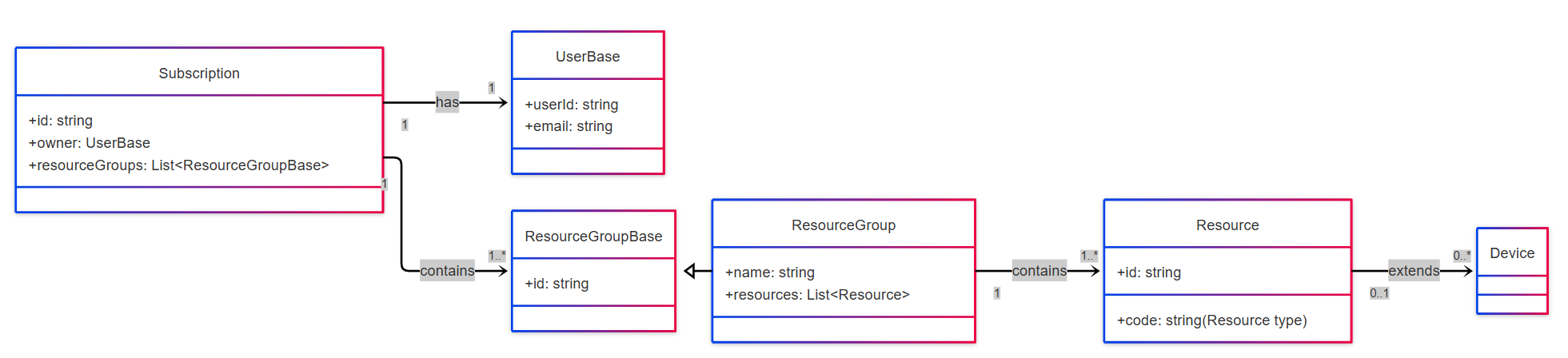
Accessing a Specific Device
To access a specific device, you need to navigate through the hierarchy of business entities — from your subscription down to the resource and its linked device. Each level provides identifiers that you use to build the next request.
List Subscriptions
Start by retrieving all subscriptions associated with your user account.
The response includes a list of subscription objects with their uniqueid.GET /api/subscriptionsFrom this list, note the
subscriptionIdof the subscription you want to work with.Get a Subscription and Its Resource Groups
Once you have a subscription ID, fetch the full subscription details to see all resource groups (for example, buildings).GET /subscriptions/{subscriptionId}Each resource group in the response contains its own
id.Get a Resource Group and Its Resources
Next, retrieve the specific resource group to list its contained resources — such as addresses, gateways, or heating controllers.GET /subscriptions/{subscriptionId}/resourceGroups/{resourceGroupId}Each resource entry includes an
idand possibly acodeor other metadata to identify it.Get a Specific Resource (eg. GWD)
Finally, use the full path to fetch a particular resource, including its devices.GET /subscriptions/{subscriptionId}/resourceGroups/{resourceGroupId}/{resourceCode}/{resoureceId}